If you sell goods on a cart, footpath, or a small roadside stall, arranging working capital from a bank can feel impossible without collateral. PM SVANidhi Yojana was created by the Government of India to solve exactly this problem. It gives street vendors small, collateral-free loans that increase step by step, along with extra rewards for repaying on time and using digital payments.
This guide explains everything in simple : what the scheme is, the current loan amounts, how to apply online, which documents you need, how the interest subsidy and cashback work, and how to check your application status.
What is PM SVANidhi Yojana?
PM SVANidhi stands for PM Street Vendor’s AtmaNirbhar Nidhi. It is a central government micro-credit scheme, launched by the Ministry of Housing and Urban Affairs, that gives collateral-free working capital loans to street vendors so they can restart, run, or grow their small businesses.
Why was it introduced?
- Street vendors often could not get formal bank loans because they had no collateral or credit history.
- Many vendors depended on informal moneylenders charging very high interest.
- The scheme was designed to give fair, low-cost credit, along with rewards for good repayment and digital transactions.
Who can benefit?
Vendors selling items such as vegetables, fruits, street food, tea, flowers, books, clothes, or small household goods from a fixed spot, cart, or mobile stall in urban or peri-urban areas can benefit from this scheme.
| Point | Details |
|---|---|
| Scheme name | PM Street Vendor’s AtmaNirbhar Nidhi (PM SVANidhi) |
| Launched by | Ministry of Housing and Urban Affairs |
| Launch date | 1 June 2020 |
| Scheme validity | Extended till 31 March 2030 after restructuring |
| Loan type | Collateral-free, working capital micro-loan |
| Loan tranches | Three rising tranches, currently up to Rs. 15,000, Rs. 25,000 and Rs. 50,000 |
| Interest subsidy | 7% per annum on timely repayment |
| Digital cashback | Reward for UPI and digital transactions, up to Rs. 1,600 under the restructured scheme |
| Guarantor or collateral | Not required |
| Official portal | pmsvanidhi.mohua.gov.in |
| Application also possible via | Common Service Centre (CSC) or your lending bank |
Loan amounts, subsidy rates and cashback limits are set by the government and can be revised. Please always confirm the latest figures on the official portal before applying.
The Three Loan Tranches Explained
PM SVANidhi works in increasing steps. You do not get the highest amount directly. You start small, repay on time, and then become eligible for the next, larger loan.
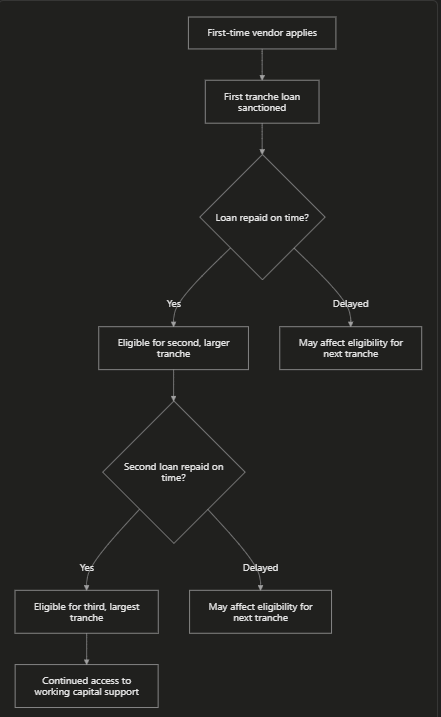
Tranche-wise summary (current structure)
| Tranche | Loan Amount | Purpose |
|---|---|---|
| First loan | Up to Rs. 15,000 | For new applicants to build a repayment history |
| Second loan | Up to Rs. 25,000 | Available after timely repayment of the first loan |
| Third loan | Up to Rs. 50,000 | Available after timely repayment of the second loan |
Why the amount increases in steps
- It helps the vendor build a credit history within the formal banking system.
- It reduces risk for the lending bank, since each step depends on proof of good repayment.
- It encourages the vendor to make digital transactions, which also build a stronger financial profile for future loans.
Old Loan Amounts vs New Restructured Amounts
Many people still search using the older loan amounts, so here is a clear comparison to avoid confusion.
| Point | Original Structure (2020) | Restructured Scheme (from August 2025) |
|---|---|---|
| First loan | Up to Rs. 10,000 | Up to Rs. 15,000 |
| Second loan | Up to Rs. 20,000 | Up to Rs. 25,000 |
| Third loan | Up to Rs. 50,000 | Up to Rs. 50,000 (unchanged) |
| Digital cashback | Lower cap | Increased, up to Rs. 1,600 |
| Scheme end date | Originally shorter duration | Extended till 31 March 2030 |
What this means for you
- If you see the old amounts (Rs. 10,000 / Rs. 20,000 / Rs. 50,000) mentioned somewhere, that refers to the original scheme design.
- If you are applying now, the current first and second tranche limits are higher (Rs. 15,000 and Rs. 25,000), while the third tranche remains Rs. 50,000.
- Always check the portal at the time of applying, since your bank will confirm the exact amount you are eligible for.
Who Can Apply? (Eligibility Categories)
The scheme recognises four categories of street vendors, so that almost every genuine vendor has a path to apply.
| Category | Description |
|---|---|
| Category A | Vendors holding a Certificate of Vending (CoV) or ID Card issued by the Urban Local Body (ULB) |
| Category B | Vendors identified in the ULB survey but not yet issued a CoV or ID card (a provisional certificate can be generated through the portal) |
| Category C | Vendors left out of the survey, or who started vending after it, who can apply using a Letter of Recommendation (LoR) from the ULB or Town Vending Committee (TVC) |
| Category D | Vendors from surrounding peri-urban or rural areas who vend within ULB limits, also applying through an LoR |
General conditions
- The applicant should be a street vendor engaged in vending in urban or peri-urban areas.
- The applicant should not already have loans of a similar nature outstanding without repayment discipline, as verified by the lender.
- A valid Aadhaar number linked to an active mobile number is required for OTP-based verification.
Documents Required
| Document | Purpose |
|---|---|
| Aadhaar card (linked to mobile number) | Identity verification through OTP |
| Certificate of Vending (CoV) or ID card | Proof of vendor status, if already issued |
| Letter of Recommendation (LoR) | Alternative proof for vendors without CoV/ID card |
| Voter ID, PAN card or driving licence | Additional identity proof, where required |
| Bank account details with IFSC code | For loan disbursal and repayment tracking |
| Passport-size photograph | For the application form |
| Mobile number | For OTP verification and status updates |
How to Apply for PM SVANidhi Loan Online (Step-by-Step)
Step 1: Keep your details ready
Make sure your Aadhaar is linked to your active mobile number, since the entire process depends on OTP verification.
Step 2: Visit the official portal
Go to pmsvanidhi.mohua.gov.in using any browser.
Step 3: Click on “Apply for Loan”
On the home page, select the “Apply for Loan” option.
Step 4: Enter your mobile number
Type your mobile number and the captcha shown, then click to generate OTP.
Step 5: Verify using OTP
Enter the OTP received on your phone to proceed to the application form.
Step 6: Select your vendor category
Choose whether you are a CoV/ID card holder, a surveyed vendor, or applying through an LoR, based on your situation.
Step 7: Fill the Loan Application Form (LAF)
Enter your personal details, vending details, chosen loan amount, and bank account information.
Step 8: Upload documents
Upload your CoV, ID card, or LoR, along with your Aadhaar card and any other requested documents.
Step 9: Submit and save your application number
After submission, note down your application number, since you will need it to track your loan status later.
Step 10: Keep a printout
Take a printout or screenshot of your submitted application for future reference.
How the Loan Approval Process Works
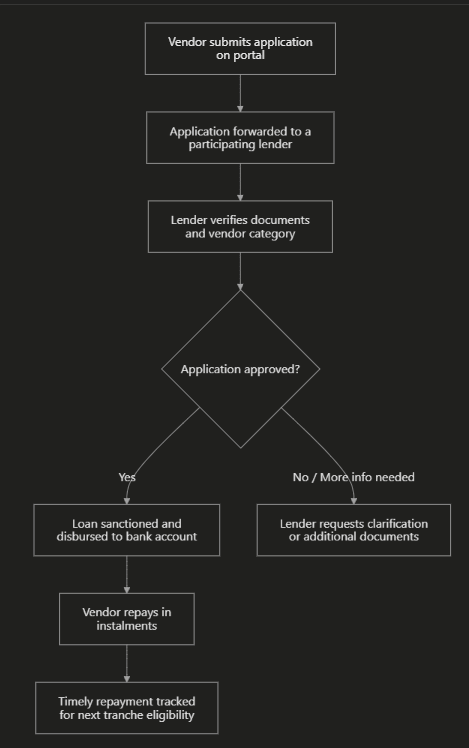
Who can be your lender?
Participating lenders include scheduled commercial banks, regional rural banks, small finance banks, cooperative banks, non-banking financial companies (NBFCs), and micro-finance institutions.
Interest Subsidy and Digital Cashback Explained
Interest subsidy
- The lender charges its normal interest rate on the loan.
- If you repay on time, the government credits a 7% per annum interest subsidy into your account.
- There is generally no penalty for early repayment, which can help you save further on interest.
Digital transaction cashback
| Feature | Details |
|---|---|
| What it rewards | Digital payments made and received by the vendor, such as UPI transactions |
| Why it matters | Builds a stronger digital transaction and credit history |
| Cashback limit | Cashback incentives credited directly to the vendor’s account, up to Rs. 1,600 under the restructured scheme |
| Extra benefit | A strong digital transaction record can support your case for the next, larger loan tranche |
How to Get a Letter of Recommendation (LoR)
If you were not surveyed and have no vending certificate, you can still apply by first getting an LoR.
Steps to request an LoR
- Visit the official PM SVANidhi portal.
- Look for the LoR request module, usually available under the application section.
- Fill in your vendor details and submit the request.
- The request is sent to your Urban Local Body (ULB) or Town Vending Committee (TVC) for review.
- Once the LoR is issued, you can proceed to fill the regular Loan Application Form.
How to Check PM SVANidhi Loan Status Online
Step-by-step method
- Visit the official portal pmsvanidhi.mohua.gov.in.
- Look for the “Application Status” or “Track Application” option.
- Enter your application ID and registered mobile number.
- Submit to view your current status, such as Submitted, Under Verification, Sanctioned, or Disbursed.
What each status means
| Status Shown | Meaning |
|---|---|
| Submitted | Your application has been received by the portal |
| Forwarded to Lender | Your application has been sent to a bank or lending institution |
| Under Verification | The lender is checking your documents and details |
| Sanctioned | Your loan has been approved |
| Disbursed | The loan amount has been credited to your bank account |
| Rejected | Application did not meet requirements; check the reason shown and reapply if eligible |
PM SVANidhi vs PM Kisan Samman Nidhi: Not the Same Scheme
Many people searching for “PM SVANidhi” also search for “PM Samman Nidhi”, which usually refers to a completely different scheme: PM Kisan Samman Nidhi, meant for farmers. Here is the difference, explained simply.
| Feature | PM SVANidhi | PM Kisan Samman Nidhi |
|---|---|---|
| Who it is for | Urban and peri-urban street vendors | Farmer families owning cultivable land |
| Type of benefit | Collateral-free loan, repaid with interest subsidy | Direct cash transfer, no repayment needed |
| Managed by | Ministry of Housing and Urban Affairs | Ministry of Agriculture and Farmers Welfare |
| Official portal | pmsvanidhi.mohua.gov.in | pmkisan.gov.in |
If you are a farmer looking for direct income support, you are likely thinking of PM Kisan Samman Nidhi, not PM SVANidhi.
Common Problems and Solutions
| Problem | Likely Reason | Solution |
|---|---|---|
| OTP not received | Aadhaar not linked to current mobile number | Update your mobile number at an Aadhaar centre and retry |
| No CoV or ID card available | Not surveyed by the ULB | Apply for a Letter of Recommendation through the portal’s LoR module |
| Application shows “Under Verification” for long | Lender still checking documents | Wait a reasonable time, then contact your lender branch or CSC for an update |
| Loan amount lower than expected | First-time applicants start at the first tranche | Repay the first loan on time to become eligible for a higher tranche |
| Website not loading | High traffic or maintenance | Try again later, or apply through a nearby Common Service Centre (CSC) |
Tips to Avoid Fraud
- PM SVANidhi loan application is free; no fee should be charged just to apply.
- No agent should ask for money to guarantee loan approval.
- Always use the official portal pmsvanidhi.mohua.gov.in, a recognised bank, or a government-authorised Common Service Centre (CSC).
- Never share your Aadhaar OTP or bank PIN with anyone over phone or message.
- Report suspicious calls or demands for money to your local bank branch, ULB office, or the police.
Why This Scheme Matters (Our Analysis)
- Formal credit access: Vendors get a fair alternative to high-interest informal moneylenders.
- Builds a financial identity: Timely repayment and digital transactions help vendors build a credit history for future needs.
- Rewards good habits: The interest subsidy and cashback structure directly reward responsible repayment and digital adoption.
Simple action plan for vendors
| Step | Action |
|---|---|
| 1 | Check which vendor category applies to you |
| 2 | Get an LoR first, if you do not have a CoV or ID card |
| 3 | Apply online for the first loan tranche |
| 4 | Repay on time and use digital payments regularly |
| 5 | Apply for the next, larger tranche once eligible |
Frequently Asked Questions
Q1. What is PM SVANidhi Yojana?
It is a central government scheme that gives street vendors collateral-free working capital loans in rising tranches, along with an interest subsidy for timely repayment and cashback for digital transactions.
Q2. What are the current PM SVANidhi loan amounts?
Under the restructured scheme, the first loan is up to Rs. 15,000, the second is up to Rs. 25,000, and the third is up to Rs. 50,000, though older material may still mention the original amounts of Rs. 10,000, Rs. 20,000 and Rs. 50,000.
Q3. How do I apply for the PM SVANidhi loan online?
Visit pmsvanidhi.mohua.gov.in, click Apply for Loan, verify your mobile number using OTP, select your vendor category, fill the Loan Application Form, upload your documents, and submit to receive your application number.
Q4. Do I need collateral or a guarantor for this loan?
No. All three loan tranches under PM SVANidhi are collateral-free, and no guarantor is required.
Q5. What documents are required for the PM SVANidhi loan application form?
You generally need your Aadhaar card linked to your mobile number, a Certificate of Vending or ID card (or a Letter of Recommendation if you do not have one), bank account details, and a passport-size photograph.
Q6. I have no vending certificate. Can I still apply?
Yes. You can request a Letter of Recommendation (LoR) through the PM SVANidhi portal from your Urban Local Body or Town Vending Committee, and then proceed with the regular loan application.
Q7. How does the interest subsidy work?
If you repay your loan on time, the government credits an interest subsidy of 7% per annum into your account, reducing your overall cost of borrowing.
Q8. How does the digital cashback benefit work?
When you make and receive digital payments such as UPI transactions as part of your business, the scheme credits cashback incentives directly to your account, up to a set limit under the restructured scheme.
Q9. How can I check my PM SVANidhi loan application status?
Visit the official portal, go to the Application Status or Track Application section, and enter your application ID along with your registered mobile number to view the current status.
Q10. Is PM SVANidhi the same as PM Kisan Samman Nidhi?
No. PM SVANidhi is a loan scheme for street vendors managed by the Ministry of Housing and Urban Affairs, while PM Kisan Samman Nidhi is a direct cash transfer scheme for farmers, managed by the Ministry of Agriculture and Farmers Welfare.
Q11. Is there any fee to apply for PM SVANidhi?
No. The application process is free. Do not pay any individual or agent who asks for money to process or approve your loan.
Q12. Until when is the PM SVANidhi scheme valid?
Following its restructuring, the scheme has been extended till 31 March 2030, so eligible vendors can continue to apply during this period, subject to any future government updates.
Important Links
| Purpose | Link |
|---|---|
| Application Form Link (Apply for Loan) | Click Here |
| Official Site (PM SVANidhi Portal) | Click Here |
| Check Loan Application Status | Click Here |
| Request Letter of Recommendation (LoR) | Click Here |
| Documents Checklist (Download) | Click Here |
| Other Yojana Info | Click Here |
| PM Awas Yojana Info | Click Here |
| Ayushman Bharat Yojana Info | Click Here |
| Latest Government Schemes | Click Here |
| Home Page | Click Here |