Women across West Bengal who applied for the Annapurna Yojana (Annapurna Bhandar Scheme) often want one simple thing after submitting their form: to know whether their application has been accepted, is under verification, or has been rejected. This guide explains, in very simple English, every method to check your Annapurna Yojana status using your Application ID, Reference Number, or registered mobile number, along with eligibility, documents, payment details, and common problems.
Annapurna Yojana, also called the Annapurna Bhandar Scheme, is a women-focused welfare programme run by the Government of West Bengal’s Department of Women & Child Development and Social Welfare. It provides direct monthly financial help to eligible women through Direct Benefit Transfer (DBT) into their Aadhaar-linked bank accounts. It replaced the earlier Lakshmir Bhandar Scheme, and existing beneficiaries were migrated into the new scheme after a fresh verification round.
| Detail | Information |
|---|---|
| Scheme Name | Annapurna Yojana / Annapurna Bhandar Scheme |
| Launched By | Government of West Bengal |
| Department | Women & Child Development and Social Welfare Department |
| Monthly Benefit | Rs. 3,000 per eligible woman |
| Payment Mode | Direct Benefit Transfer (DBT) to Aadhaar-linked bank account |
| Age Eligibility | 25 to 60 years |
| Application Modes | Online and Offline (BDO / SDO / KMC ward offices) |
| Replaces | Lakshmir Bhandar Scheme |
| Status Check Options | Application ID / Reference Number, or Registered Mobile Number + OTP |
Why Checking Your Application Status Matters
After the scheme’s large-scale verification drive, several lakh applications were flagged, sent to enquiry, or rejected due to duplicate entries, incorrect Aadhaar-bank linking, citizenship checks, or applicants who had shifted out of the state. Checking your status regularly helps you:
- Confirm whether your form has been accepted or is still pending
- Find out the exact reason if your application is rejected
- Correct mistakes before the next verification cycle
- Track when the monthly Rs. 3,000 instalment will reach your bank account
- Avoid depending on unofficial websites or middlemen who may ask for money
Step-by-Step: How to Check Annapurna Yojana Status Using Application ID
Follow these steps carefully on the official West Bengal government portal.
Step 1: Visit the Official Portal
Open the West Bengal Social Registry / Social Security portal on your phone or computer browser.
Step 2: Locate the Status/Tracking Option
Look for an option usually labelled “Track Application”, “Track Applicant Status”, or “Application Status” on the homepage.
Step 3: Enter Application ID or Reference Number
Type in the Temporary Application ID / Application Reference Number you received at the time of submitting your form (this is usually printed on your acknowledgement receipt).
Step 4: Complete OTP Verification
Enter the OTP sent to your registered mobile number to confirm it is really you checking the status.
Step 5: View Your Status
Your current application stage will be displayed on the screen, such as Submitted, Under Enquiry, Approved, or Rejected.
Alternative Method: Status Check Using Registered Mobile Number
Many applicants do not have their Application ID handy, or the ID slip is lost. In that case, the portal also allows a mobile-number-based login.
| Step | Action |
|---|---|
| 1 | Go to the official portal and click “Access Citizen Portal” |
| 2 | Select your district from the dropdown list |
| 3 | Enter your registered mobile number |
| 4 | Verify using the OTP sent to your phone |
| 5 | View your application and payment status after login |
Status Categories Explained
Understanding what each status label actually means helps reduce confusion and panic.
| Status Shown | What It Means |
|---|---|
| Submitted / Pending | Your form has reached the office but review has not started |
| Under Enquiry / Under Verification | Officials are checking your Aadhaar, residency, or bank details; this is not a rejection |
| Approved / Sanctioned | Your application is accepted and you are added to the beneficiary list |
| Rejected | Your application did not meet eligibility, with a reason usually mentioned |
| Payment Processed | The monthly amount has been sent to your bank account via DBT |
Offline Status Check Option
If you do not have internet access or the online portal is not responding, you can still check your status offline.
- Visit your nearest Block Development Office (BDO)
- Visit the Sub-Divisional Office (SDO) for urban areas
- Visit your Kolkata Municipal Corporation (KMC) ward office if you live in Kolkata
- Carry your acknowledgement receipt and Aadhaar card
- Ask the concerned official to check your application status manually
Eligibility Criteria for Annapurna Yojana
- Applicant must be a woman and a permanent resident of West Bengal
- Age must be between 25 and 60 years
- Applicant must not hold a permanent government job
- Applicant must not be receiving a regular central or state government pension
- Applicant must not be an income tax payer
- Bank account must be a single-holder account, not a joint account
- Aadhaar number must be correctly linked with the bank account through NPCI
Documents Required
- Aadhaar Card
- Voter ID Card (EPIC) with name and part number
- Active mobile number linked with Aadhaar
- Bank passbook or account details (single holder)
- Caste certificate, if applicable
- Swasthya Sathi Card, where required
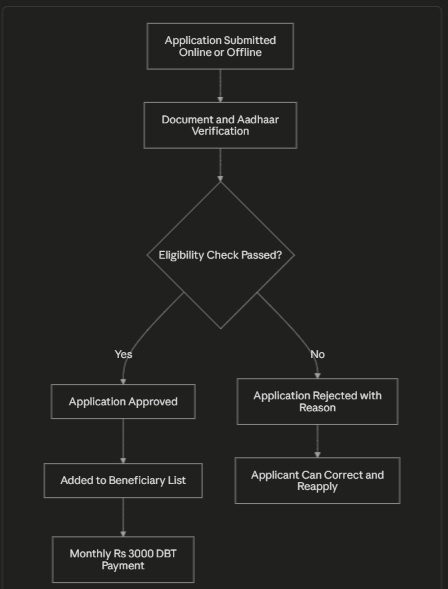
Application Verification Flow
The diagram below shows how an application typically moves from submission to payment.
Common Reasons for Rejection or Delay
| Reason | Suggested Fix |
|---|---|
| Aadhaar not linked with bank account | Visit your bank branch to complete Aadhaar seeding |
| Joint bank account submitted | Open or switch to a single-holder account |
| Duplicate application found | Contact BDO/SDO office to resolve duplication |
| Applicant shifted outside West Bengal | Update residency proof at the local office |
| Mismatched name or date of birth across documents | Correct documents and reapply with matching details |
| Citizenship or residency scrutiny pending | Wait for verification or provide requested proof |
Tips to Avoid Fraud While Checking Status
- Only use the official government portal; never share Aadhaar, OTP, or bank details with unknown callers
- The government does not charge any fee for application or status check
- Ignore any website or app asking for payment to “speed up” your status
- Save your acknowledgement number safely, either as a photo or written note
- Keep your mobile number active, since OTP and updates are sent to it
Payment and Disbursement Overview
| Item | Detail |
|---|---|
| Benefit Amount | Rs. 3,000 per month |
| Transfer Method | Direct Benefit Transfer (Aadhaar-linked bank account) |
| Frequency | Monthly |
| Database Update | Beneficiary list refreshed periodically after verification |
| How to Confirm Receipt | Check bank passbook, net banking, mobile banking app, or ATM mini statement |
FAQs on Annapurna Yojana Status Check West Bengal
Can I check my Annapurna Yojana status without an Application ID?
Yes. If you do not have your Application ID, you can check your status using your registered mobile number and OTP verification on the official portal, after selecting your district.
What should I do if my application shows “Under Enquiry”?
“Under Enquiry” simply means your documents and details are still being verified by officials; it is not a final rejection. You should continue checking periodically and be ready to submit any additional document if asked by the BDO or SDO office.
Is there any fee to check Annapurna Yojana application status?
No. Checking your application status on the official West Bengal government portal is completely free. Any website or person demanding payment for status checking is not authorised.
How often is the beneficiary list updated?
The beneficiary database is generally refreshed at regular intervals as verification continues, so it is a good idea to check your status every few days rather than only once.
What if my application gets rejected?
You can check the exact rejection reason on the portal, correct the identified issue such as bank linking or document mismatch, and reapply through the official reapplication window when it opens.
Whom should I contact if the portal does not recognise my mobile number?
You should contact the authorised Block Development Officer (BDO), Sub-Divisional Officer (SDO), or your municipal corporation office for assistance.
Quick Links
| Purpose | Link |
|---|---|
| Application Form Link | Click Here |
| Official Site | Click Here |
| Other Yojana Info | Click Here |
| Home Page | Click Here |
| Status Check Portal | Click Here |
| Grievance / Contact BDO-SDO Office | Click Here |